MuseCantoMuseCanto
AI integrationsPricing
Resources
  • Changelog
  • Docs
  • Blog
  • Download
Log inStart creating
MuseCantoMuseCantoLoading…

Changelog

Product updates

A record of MuseCanto feature and experience changes.

ProductOctober 16, 2026

Rename articles and X drafts from MCP

Connected AI clients can rename an existing article or X draft while revising it.

AI clients connected through MCP can now rename an article or X draft they already saved. You can keep revising in the same conversation.

  • update_document accepts an optional title with the revised Markdown.
  • update_x_thread accepts an optional title with the post text.
  • A title is 1–150 characters. An empty or longer title is rejected, and the saved draft stays as it was.
  • The new title shows up in MuseCanto and in the next read. A collaborative article also keeps the rename in version history.

See the MCP overview.
ProductSeptember 28, 2026

MCP is live across the AI clients

Cursor, Claude Code, Codex, ChatGPT, and Grok now connect to MuseCanto over MCP.

The AI clients you already use can connect to MuseCanto: Cursor, Claude Code, Codex, ChatGPT, and Grok.

Once connected, they can read the library and topics, and draft documents. Setup lives in the MCP overview.

ProductSeptember 18, 2026

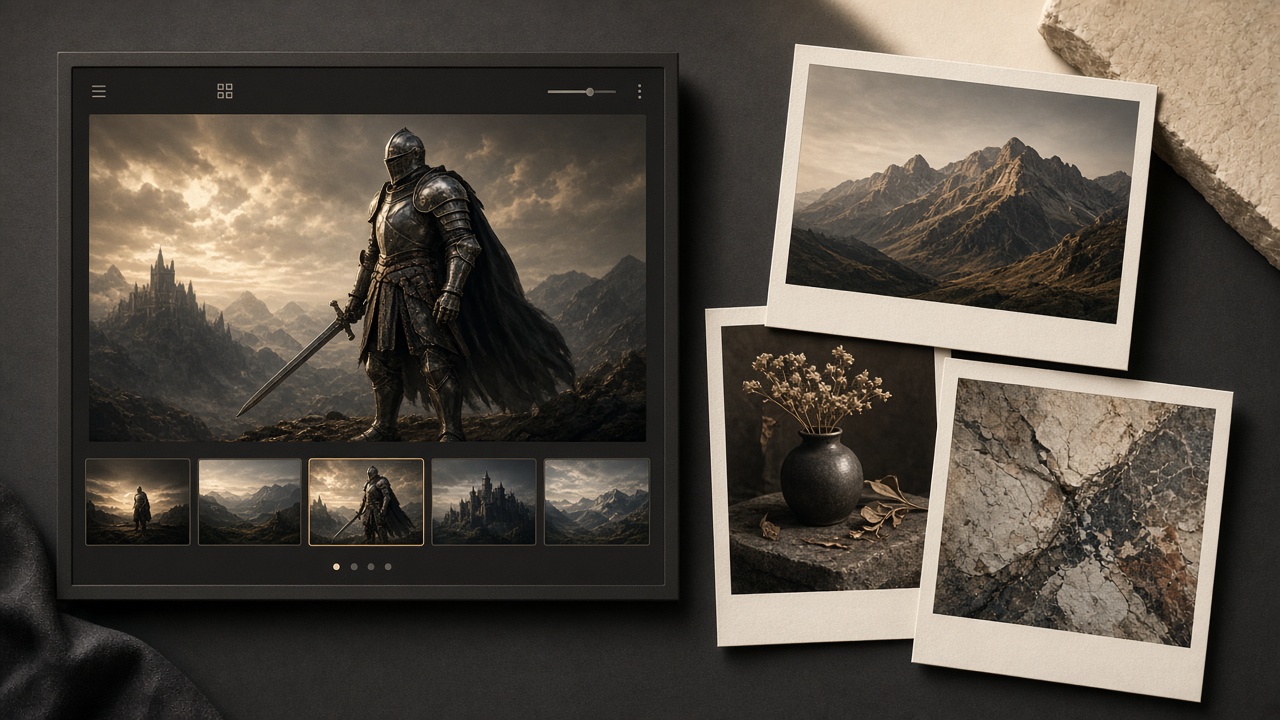
Gallery documents in the library

The library now has gallery documents: a hero image, a filmstrip, a cover, drag-to-reorder, and a prompt up to 20,000 characters.

MuseCanto gallery document preview

The library can now hold gallery documents alongside articles and X posts.

A gallery is for a set of images, not an article stuffed with pictures:

  • One layout: read and edit both use a hero image plus a filmstrip.
  • Cover: star an image; the tree and lists use that cover.
  • Order: drag the filmstrip while editing.
  • Prompt: paste a generation prompt while editing, up to 20,000 characters. Hidden in read mode.
  • Limit: 20 images per gallery.

Galleries do not ship through the browser extension and have no social preview. To publish, keep using articles (extension) or X posts (official API).

Guide: Gallery docs.

ProductSeptember 10, 2026

MCP Server Launch and Chrome Extension Store Release

Connect AI clients like Cursor and Claude Code via Model Context Protocol (MCP) to read and write MuseCanto content; browser extension is now live on the Chrome Web Store with new Reddit distribution support.

This release introduces two major integrations: the MCP Server for AI-assisted writing workflows and the official Chrome Web Store release for our browser extension.

  • MCP Server Support: Connect MuseCanto to AI coding assistants like Cursor, Claude Code, and Codex via the standard Model Context Protocol. AI assistants can now inspect workspace resources, search documents, read topic backlogs, and author documents or X thread drafts directly from conversations.
  • Image Upload Pipeline: Added MCP tools to create, confirm, and attach images to X thread drafts and collaborative documents with natural dimension preservation.
  • Granular Permissions & Safety: Secured with OAuth 2.0 (mcp:read and mcp:write scopes), 24-hour idempotency keys to prevent duplicate actions, and rate limiting. Manage or revoke access anytime from MCP Settings.
  • Chrome Web Store Live: The browser extension is now officially live on the Chrome Web Store, giving Chrome and Edge users 1-click installation and automatic updates.
  • Reddit Distribution Support: Added a dedicated platform adapter for Reddit, expanding multi-platform autofill alongside WeChat Official Accounts, Zhihu, Xiaohongshu, Juejin, and X (Twitter).
  • Safe Draft Autofill: Content autofill strictly prepares drafts in target platform editors, ensuring creators retain full control before publishing.

For setup guides and tool references, check the MCP Overview, Cursor Connection Guide, and the Browser Extension Guide.

ProductAugust 28, 2026

GitHub and X can connect multiple accounts

GitHub Issue export and X posts can both connect multiple accounts now, up to 5 per user. Pick the account when you export or publish.

Connecting multiple accounts is now a first-class MuseCanto integration feature.

  • GitHub: one MuseCanto user can connect up to 5 GitHub accounts. Set a default, give each account its own default repository, and pick the account when you export a topic as an Issue.
  • X posts: up to 5 accounts, then choose which one a draft should hit. See the earlier note on scheduled X posts and multiple connected accounts.

Connecting extra X accounts does not increase the monthly post allowance. Both features need Pro or above. Guide: Publish to X posts.

ProductAugust 26, 2026

Write X posts on the calendar and send them from there

The content calendar now holds topics and X scheduling together. Write a thread in a topic, publish now or later. Pro includes 1,000 posts a month; Team includes 1,500.

An open monthly planner and a few short post cards

Topics are no longer just notes. X posts can stay on the content calendar: write them, send them now, or pick a time.

  • Create a topic as long-form or an X post. Write the thread in the dialog — it does not have to live in a knowledge base first.
  • The calendar shows target dates, upcoming sends, failed sends, and posted threads. Today surfaces what needs attention.
  • Long-form still moves into a knowledge base before the extension ships it. The library keeps essays and the X posts you want to keep.
  • Publishing to X needs Pro or above. Pro includes 1,000 posts per month; Team includes 1,500. Free can capture topics, but cannot send.

You can still connect more than one X account and choose which one a draft hits. Reschedule, cancel, and retry after a failure from the topic or from operations.

See the content calendar and publish to X guides.

ProductAugust 26, 2026

Schedule X posts, and connect more than one account

X threads can now go out on a schedule, to a specific connected account. Personal settings also live in one dialog.

System publish is no longer immediate-only.

  • Pick a time for an X thread; it goes out then, and you can reschedule or cancel. The topic dialog and operations both work.
  • Connect more than one X account to the same MuseCanto user, then choose which account a draft should hit. One draft still publishes to one account.
  • Personal settings open from the sidebar: general, security, billing, tokens, and integrations.

System publish still needs Pro or above. Already-published threads cannot be scheduled again. Same day: write X posts on the calendar and send them from there.

ProductAugust 15, 2026

Sideload the Chrome extension

Until the Chrome Web Store listing is live, you can install MuseCanto in Developer mode from a ZIP — about a minute of setup.

The store listing is still under review, so the extension ships as an unpacked ZIP for now.

  • Download the package from the download page.
  • Follow the install guide to load it in Chrome or Edge.
  • Pin the toolbar icon if it does not appear after loading.

Sideloaded builds do not auto-update. When a new ZIP is published, replace the unpacked folder and load it again.

MilestoneAugust 8, 2026

MuseCanto is live

The public web app is open: topics, a master-draft knowledge base, and two ways to ship — long-form through the browser extension, and X posts through the official API.

MuseCanto starts as a creator workspace, not a publishing dashboard you have to rebuild for every platform.

  • Plan topics in year, month, week, day, and list views.
  • Keep essays and X posts in one knowledge base.
  • Ship long-form with the browser extension, and publish X posts with the official API.

This is the first public cut. More distribution surfaces and a native mobile app are still in progress — they will show up here when they actually ship.

MuseCantoMuseCanto

Your content creation and publishing workspace. Distribute articles, schedule X posts, and connect the AI you know.

Product

  • Features
  • Workflow
  • Pricing
  • Download
  • Changelog

Resources

  • Docs
  • Blog
  • Contact

Legal

  • Privacy Policy
  • Cookie Policy
  • Terms of Service
  • Community Guidelines

© 2026 MuseCanto. All rights reserved.

Built by the MuseCanto team